
Tuesday, October 4, 2016
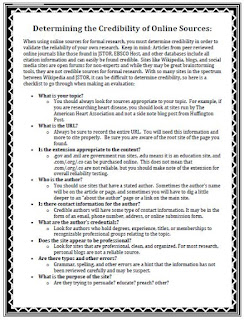
FREE! Determining the Credibility of Online Sources
Do you get frustrated with your students when you ask them to research something on the internet and they use the first website that pops up? Here is the cure for the madness! Give your students this useful handout, "Determining the Credibility of Online Resources", BEFORE they begin their research. Better research strategies for them, less gray hairs for you! And it's FREE!

Monday, September 26, 2016
2016 Presidential Debates
The 2016 Presidential debates begin tonight with Hillary Clinton and Donald Trump taking center stage. These debates will most likely be the most viewed in American history. All debates begin at 9pm ET and can be viewed on most network news channels. I often tell my students to watch them on YouTube so they can pause and review the video when necessary. Here is a FREE debate viewing activity for your secondary students to complete by watching the debates.

2016 Presidential Debate Schedule:
2016 Presidential Debate Schedule:
•
Monday, September 26, 2016
First presidential debate
Moderator: Lester Holt, Anchor, NBC Nightly News
Location: Hofstra University, Hempstead, NY
First presidential debate
Moderator: Lester Holt, Anchor, NBC Nightly News
Location: Hofstra University, Hempstead, NY
•
Tuesday, October 4, 2016
Vice presidential debate
Moderator: Elaine Quijano, Anchor, CBSN and Correspondent, CBS News
Location: Longwood University, Farmville, VA
Vice presidential debate
Moderator: Elaine Quijano, Anchor, CBSN and Correspondent, CBS News
Location: Longwood University, Farmville, VA
•
Sunday, October 9, 2016
Second presidential debate
Moderator: Martha Raddatz, Chief Global Affairs Correspondent and Co-Anchor of "This Week," ABC
Moderator: Anderson Cooper, Anchor, CNN
Location: Washington University in St. Louis, St. Louis, MO
Second presidential debate
Moderator: Martha Raddatz, Chief Global Affairs Correspondent and Co-Anchor of "This Week," ABC
Moderator: Anderson Cooper, Anchor, CNN
Location: Washington University in St. Louis, St. Louis, MO
•
Wednesday, October 19, 2016
Third presidential debate
Moderator: Chris Wallace, Anchor, Fox News Sunday
Location: University of Nevada, Las Vegas, Las Vegas, NV
Third presidential debate
Moderator: Chris Wallace, Anchor, Fox News Sunday
Location: University of Nevada, Las Vegas, Las Vegas, NV
Click HERE for engaging election activities!
Happy Teaching!
Sunday, September 11, 2016
Teaching About 911 in the Secondary Classroom
911 was the worst tragedy on American soil. It resulted in the largest loss of life in American history. Many of our students were too young to remember that tragic day but often have many questions, especially the reasons why we were attacked. Here are a few interesting facts about 911 you could share with your students:
 1. On September 11, 2001 the terrorist group al-Qaeda organized a series of four coordinated terrorist attacks that killed 2, 996 peopled and injured over 6,000 others. It also caused $10 billion in property damage.
2. Michael Jackson had a meeting at the World Trade Center on 911 but overslept.
3. Although Osama bin Laden initially denied his involvement in the attacks, in 2004 he claimed responsibility.
4. Family Guy's creator had ticket for a 9/11 plane but came 10 minutes late.
5. Two F16 pilots went on a suicide mission to stop Flight 93 on 9/11. In the end, the flight's passengers took the plane down.
6. 18 people were rescued alive from the rubble of the World Trade Center site.
7. Passengers aboard United Flight 93, heard about the previous airplane attacks and attempted to retake control of the plane from hijackers. As a result, the hijackers deliberately crashed the plane in a Pennsylvania field instead of at their unknown target.
Last year I used this activity to teach my high school U.S. History students about 911.
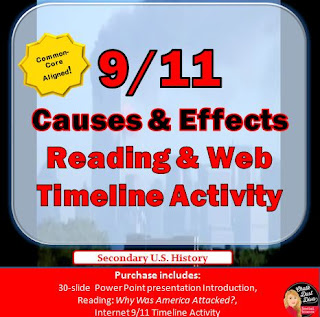
As students first enter the room students will watch a slide show of pictures of 9/11 while a patriotic song plays in the background. They will then learn about the causes of 9/11 by reading and answering essential questions. To end, students will complete 17 questions related to the 9/11 Memorial interactive timeline. On the timeline they will watch videos and listen to audio accounts of the events of that tragic day. Students will reflect on what they learned by answering an essential question.
This is activity is something your students will never forget!
Happy Teaching!

2. Michael Jackson had a meeting at the World Trade Center on 911 but overslept.
3. Although Osama bin Laden initially denied his involvement in the attacks, in 2004 he claimed responsibility.
4. Family Guy's creator had ticket for a 9/11 plane but came 10 minutes late.
5. Two F16 pilots went on a suicide mission to stop Flight 93 on 9/11. In the end, the flight's passengers took the plane down.
6. 18 people were rescued alive from the rubble of the World Trade Center site.
7. Passengers aboard United Flight 93, heard about the previous airplane attacks and attempted to retake control of the plane from hijackers. As a result, the hijackers deliberately crashed the plane in a Pennsylvania field instead of at their unknown target.
Last year I used this activity to teach my high school U.S. History students about 911.
As students first enter the room students will watch a slide show of pictures of 9/11 while a patriotic song plays in the background. They will then learn about the causes of 9/11 by reading and answering essential questions. To end, students will complete 17 questions related to the 9/11 Memorial interactive timeline. On the timeline they will watch videos and listen to audio accounts of the events of that tragic day. Students will reflect on what they learned by answering an essential question.
This is activity is something your students will never forget!
Happy Teaching!
Saturday, August 27, 2016
Teaching with Timelines
Timelines are a great way to have your students "visualize" important events in history. Not only are there diverse ways for your students to create timelines but they can be created for any event, topic or person. Creating timelines also appeals to all types of learners; visual, mathematical, and kinesthetic.
Check out the possibilities for Timelines in the Classroom:
EKG Timeline
An EKG is an instrument used in the medical field to check the electrical activity of the heart. If you look at an EKG machine you can see the spikes and dips of the heart beat. Students will use this same idea in creating a timeline. The spikes and dips on the timeline do not represent heartbeat, but rather represent the importance of the event. The higher the spike, the more important the event. This is a great way to assess your students' understanding of the events they include on their timeline.
 Timeglider
With Timeglider.com students create a web-based timeline. Students choose a date, write a description and add a picture from the internet. They can also change the significance of the event by making the event larger or smaller. After students create their timeline they simply copy and paste the url link to GoogleClassroom or any other classroom website.
TimelineJs
Another great web-based timeline creator, TimelineJS allows students to add text, pictures and dates. I find it easier to read than Timeglider. Students can also insert GoogleMaps to indicate locations of events. Many of these web-based timeline creators are so easy to use, I rarely have to give instructions. Many students just figure it out themselves.
Clothesline Timeline
Students work together to create a timeline using note cards, string and clothesline pins. This is a great cooperative activity.
WhenInTime
WhenInTime is a easy tool for students to create professional looking, web-based timeline. Events can be imported and added to the timeline from a number of social media sites such as Google+, Twitter and YouTube. It also provides several themes and templates for your students to choose from.
I hope you consider incorporating timelines into your classroom using these easy tools. I would love to here more ideas about how your students create timelines in your classroom.
Happy Teaching!
Check out the possibilities for Timelines in the Classroom:
EKG Timeline
An EKG is an instrument used in the medical field to check the electrical activity of the heart. If you look at an EKG machine you can see the spikes and dips of the heart beat. Students will use this same idea in creating a timeline. The spikes and dips on the timeline do not represent heartbeat, but rather represent the importance of the event. The higher the spike, the more important the event. This is a great way to assess your students' understanding of the events they include on their timeline.

With Timeglider.com students create a web-based timeline. Students choose a date, write a description and add a picture from the internet. They can also change the significance of the event by making the event larger or smaller. After students create their timeline they simply copy and paste the url link to GoogleClassroom or any other classroom website.
TimelineJs
Another great web-based timeline creator, TimelineJS allows students to add text, pictures and dates. I find it easier to read than Timeglider. Students can also insert GoogleMaps to indicate locations of events. Many of these web-based timeline creators are so easy to use, I rarely have to give instructions. Many students just figure it out themselves.
Clothesline Timeline
Students work together to create a timeline using note cards, string and clothesline pins. This is a great cooperative activity.
WhenInTime
WhenInTime is a easy tool for students to create professional looking, web-based timeline. Events can be imported and added to the timeline from a number of social media sites such as Google+, Twitter and YouTube. It also provides several themes and templates for your students to choose from.
I hope you consider incorporating timelines into your classroom using these easy tools. I would love to here more ideas about how your students create timelines in your classroom.
Happy Teaching!
Friday, August 12, 2016
Back-to-School BUNDLES
It's that time of year when we begin to say "good-bye" to summer and "hello" to a new school year. Not only do we have to get used to the sound of the alarm clock and getting dressed before noon, but we also need to prepare for the first week of school.
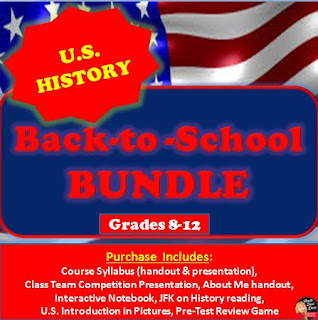
The first week of school in my secondary social studies classroom always includes a "getting-to-know" you activity, a review of the course and classroom rules, and a cooperative group lesson. Depending on the course, I might also include a "why study history" activity and a lesson about how to "think like a historian". Knowing that most classes will be doing similar lessons, I try to make the lessons fun and engaging.
If you are looking to make your first week of school less stressful, you might want to consider purchasing these Back-to-School BUNDLES! Everything you need for the first week of school is included!

 Happy Teaching!
The first week of school in my secondary social studies classroom always includes a "getting-to-know" you activity, a review of the course and classroom rules, and a cooperative group lesson. Depending on the course, I might also include a "why study history" activity and a lesson about how to "think like a historian". Knowing that most classes will be doing similar lessons, I try to make the lessons fun and engaging.
If you are looking to make your first week of school less stressful, you might want to consider purchasing these Back-to-School BUNDLES! Everything you need for the first week of school is included!
Thursday, July 28, 2016
Google My Maps in the Classroom
Do you struggle to find an activity that is student-centered, technology based, and common-core aligned? Well look no further! GoogleMyMaps.com meets all of those requirements! And, it's super easy! In fact, recently in my summer school class I gave my 10th grade students a very brief introduction and they were able to figure it out on their own. You can have your students map the battles of World War II, The Cold War or The Civil War. The possibilities are endless!

Students simply sign-in to their google account and go to https://mapsengine.google.com/map/. They then search a location and add a placemarker, a description of the event and a picture. They can also add shapes, lines, and rulers. I then had my students turn in their map by simply copying the link to Google Classroom. (Be sure students change the "share" settings to "anyone can have access with the link").
You can see a great video tutorial HERE.
See my Google Maps Activity for the Cold War HERE.
See my Google Maps Activity for the Battles of World War II HERE
Happy Teaching!

Students simply sign-in to their google account and go to https://mapsengine.google.com/map/. They then search a location and add a placemarker, a description of the event and a picture. They can also add shapes, lines, and rulers. I then had my students turn in their map by simply copying the link to Google Classroom. (Be sure students change the "share" settings to "anyone can have access with the link").
You can see a great video tutorial HERE.
See my Google Maps Activity for the Cold War HERE.
See my Google Maps Activity for the Battles of World War II HERE
Happy Teaching!
Saturday, July 16, 2016
Teaching "Growth Mindset" in the Secondary Classroom
During the first week of school I always begin with teaching my students about the concept of "Growth Mindset". I begin by asking my students some basic questions:
 I then have my students complete a reading, "Success is a Mindset" where they learn what it means to have a “growth mindset” and how
the views and beliefs they have about themselves impacts the decisions
they make and the lives they lead. Students will learn the difference
between a growth mindset and a fixed mindset, understand that
intelligence is not fixed and suggestions on how to foster a growth
mindset.
 Students with a growth mindset see challenges as opportunities rather than negative judgements about who they are. Therefore, teaching "Growth Mindset" is essential in any classroom!
To see the activity I use in my classroom click HERE!
Happy Teaching!

To see the activity I use in my classroom click HERE!
Happy Teaching!
Subscribe to:
Posts (Atom)
